EJS is a template language that uses JavaScript to generate HTML, while also allowing templates and data to be shared across multiple pages. This post demonstrates how to use an active class to show users which page is currently being accessed in a Node.js application using EJS as the template engine.
Boilerplate
By clicking here you can clone a boilerplate with the minimum configuration needed for the application to run.
Getting Started and Project Structure
With the application running, let’s get started.
To better understand the project, we can notice the following structure:
- Views - directory where the application looks for EJS files.
- Public - directory for static files.
- Routes - directory used to define which route renders each template.
We will only modify the public and views folders. Add the following CSS to style.css:
.nav-link {
    text-decoration: none;
    font-size: 20px;
    color: #fff;
    background: #333;
}

.nav-link:hover {
    background: purple;
}

.active {
    background: purple;
}
Getting Dynamic Active Classes
Next, to achieve a dynamic active class in EJS, we’ll make use of variables and partials. Partials are reusable templates created to avoid code repetition and share components across views.
Inside the views/partials directory, create a file called nav.ejs with the following code:
<nav>
    <a class="<%= active === 'Home' ? 'nav-link active' : 'nav-link'%>" href="/">Home</a>
    <a class="<%= active === 'About' ? 'nav-link active' : 'nav-link'%>" href="/about">About</a>
    <a class="<%= active === 'Contact' ? 'nav-link active' : 'nav-link'%>" href="/contact">Contact</a>
</nav>
We created a reusable .ejs template. EJS syntax uses <%= %> to define variables, create conditionals, loops, and output variable values.
Inside the class attribute, using EJS syntax, we created a variable called active and compared its value with Home, About, and Contact using a ternary condition. If the condition is true, the active link will be highlighted while the others remain unchanged.
Finishing Up
Now that we have our reusable template with the conditions defined, we can include it in our pages.
To include an EJS template inside another page, we use:
<%- include(relative/path/to/file) %>
So now we’ll add the template to each page inside the pages directory. Inside each page, add the following code right above the h2 tag:
<%- include('../partials/nav', {active: 'About' }); %>
Notice that after passing the relative path to the partial, we’re also passing a value to the active variable defined in nav.ejs. This is how you assign values to variables in EJS when importing templates into another view.
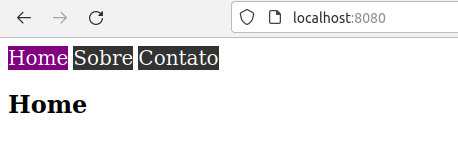
Finally, after including the template in all pages and defining the appropriate value for the active variable, we will get the following final result.
I hope you enjoyed it! This was my first post, so tips on how I can improve both my writing and this code are very welcome. See you next time 💜